Whelp
Real reviews from real party members. Rate your tanks, healers and DPS out of five stars, right inside World of Warcraft: Classic Forever.
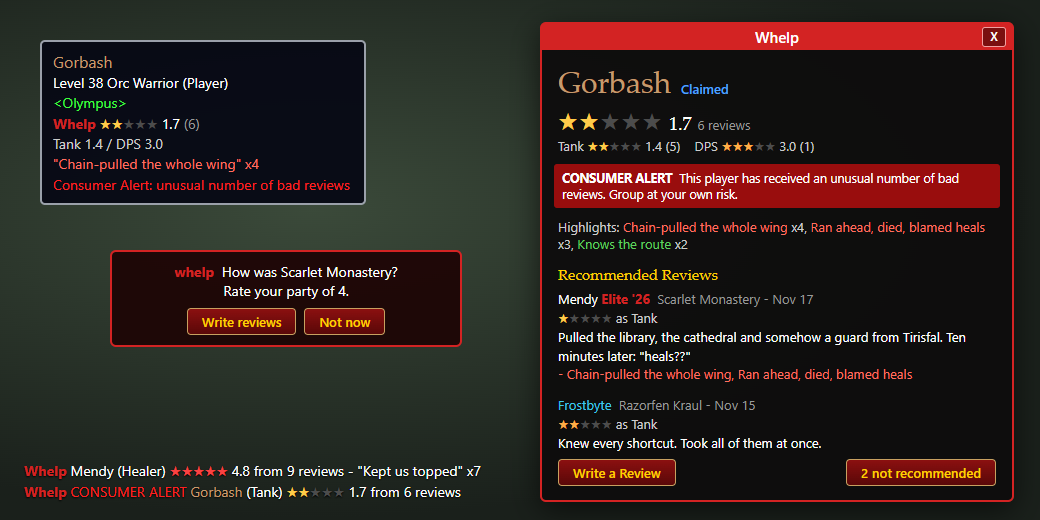
“Pulled the library, the cathedral and somehow a guard from Tirisfal.” ★☆☆☆☆
A first release. It’s been tested against a stand-in for the game, not yet in a real dungeon run, so the windows may still need some tidying.
Install
- Exit World of Warcraft.
- Unzip the download. You get a folder called
Whelp. - Move that folder into your AddOns folder:
C:\Program Files (x86)\World of Warcraft\_forever_\Interface\AddOnsOn a Mac, the folder starts with/Applications/World of Warcraft/. If you installed the game somewhere else, look there. - Check the folder isn’t doubled. This file should exist:
...\AddOns\Whelp\Whelp.toc - Start the game. On the character select screen, click AddOns and make sure Whelp is ticked.
- Try it. Type
/whelpin chat, or right-click a player and pick See reviews.
If it doesn’t show up
- Not in the AddOns list? Look for a doubled folder like
AddOns\Whelp\Whelp\. - Marked out of date? Tick Load out of date AddOns on the same screen.
- Updating? Exit the game, delete the old folder and install the new one. Your reviews are kept.
Writing reviews
- After a dungeon, Whelp asks how it went. Click Write reviews to rate the party.
- Your current group and your last 15 parties are listed, so you can review people after the group breaks up.
- Pick a role to review them as: Tank, Healer or DPS. Someone who tanked one night and healed the next can get a review for each.
- Give one to five stars, from “Not good” to “Great”.
- Tick highlights, four good and four bad for each role: “Steady pulls” or “Chain-pulled the whole wing”, “Dispels like a champ” or “Was DPSing instead”, “Interrupts!” or “Needed on everything”.
- Write up to 140 characters. Change your mind later and your new review replaces the old one.
Reading reviews
- Tooltips show a player’s stars, their rating per role and their most common highlight.
- Their page lists every review, newest first, with stars, highlights and where it happened.
- A chat line tells you when someone with reviews joins your group.
- Consumer Alert: three or more reviews averaging under two stars get a red warning. Group at your own risk.
- Not recommended: reviews from players who have written fewer than three are filed away at the bottom of the page.
- Elite: players who have written 20 or more reviews get a badge. Claimed means the player uses Whelp too.
Commands
/whelpwrite a review of your party, or a recent one (/yelp works too)
/whelp Nameread a player’s reviews (add -Realm for another realm)
/whelp targetread your target’s reviews
/whelp meread what other Whelp users wrote about you
/whelp promptturn the after-dungeon question on or off
/whelp shareturn sharing your reviews on or off
/whelp tooltipturn ratings on tooltips on or off
/whelp alertsturn the join alerts on or off
How reviews get around
- Reviews travel between Whelp users over guild and group addon chat. The more of your guild runs it, the more reviews you see.
- Everyone only sends their own reviews, so nobody can post one in someone else’s name.
- That also means you only hear from Whelp users who are online in your guild or group. Reviews you’ve already received are saved.
- Turn off
/whelp shareand your reviews stay on your computer. - A run ends when you leave the group, enter another instance, or stay outside for two minutes. Corpse runs don’t count. You’re asked for reviews after four minutes in an instance or a boss kill.
What’s new
- 1.0.0: first release.