The Endgame is Me: the WoW addon
The whole reverse boss fight, in a window inside World of Warcraft. You are the raid boss, pacing between a rock and another rock, while your actual raid argues about loot. For Classic Forever and retail.
An early release. The browser game’s own code, translated to Lua and drawn on 57,600 very small squares.
Treat both as test releases. On Classic Forever it has been played in the live game as far as the Hoard, and the Controls panel works there; a run all the way to the castle has so far only been played against a stand-in for the game’s API, and so has the newest part of 1.3 (adventurers and the boss shown as pictures; /endgame sprites off turns that off). The retail build hasn’t been run in a live client yet.
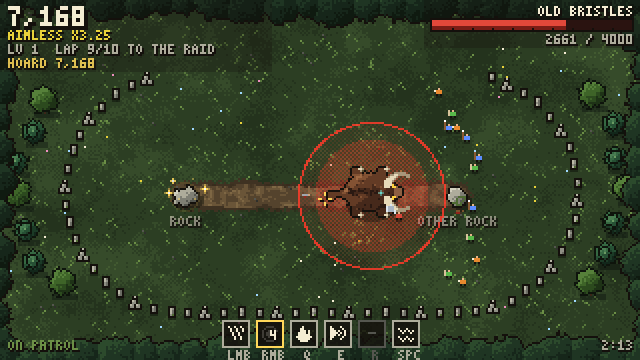
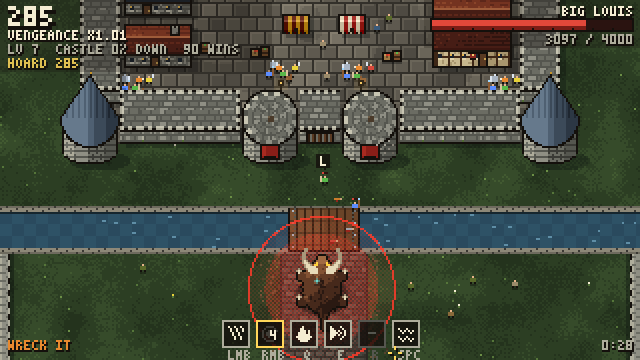
How to play
- Type
/endgameto open or close the window. There’s also a button under Options > AddOns. Drag the window by its title bar. - WASD or the arrow keys walk. The mouse aims.
- Left click swipes; hold it down to keep swiping. Right click, Q, E and R are your other abilities. Space shakes your fur.
- Esc pauses and hands the keyboard back to WoW. M mutes.
- Want other keys? Open Controls on the game’s menu or the pause menu, click the key you want to change, then press the new one or click a mouse button. The letters under the ability buttons follow along. Esc always pauses, whatever you choose.
- More abilities than buttons? A new ability takes a free button if there is one. To move one, click a slot in the Hoard and pick what goes on it. Only that slot changes; if your pick was on another button, the two trade places.
- It’s the same game as the browser version: seven levels, the Hoard between them, the quiet man on the horse, and New Game+ when the castle falls.
The first time you open it
The picture is made of 57,600 tiny textures, and WoW is fussy about how it’s handed that many. So the first time the window opens it shows a test card and asks whether you can see coloured stripes, edge to edge, inside a white border.
- You can: click Yes, all of it. It remembers, and you won’t be asked again.
- You can’t: click No and it tries another way.
- Your whole interface vanishes: press Space. That switches the picture off, which should bring the interface back, and the addon moves on to the next way. If it doesn’t come back, press Enter, type
/reloadand press Enter again.
Install
- Exit World of Warcraft. A brand new addon isn’t picked up by a reload.
- Unzip the download. You get a folder called
TheEndgameIsMe. - Move that folder into the AddOns folder for your version of the game:
Classic Forever: C:\Program Files (x86)\World of Warcraft\_forever_\Interface\AddOnsRetail: C:\Program Files (x86)\World of Warcraft\_retail_\Interface\AddOnsOn a Mac, the folder starts with/Applications/World of Warcraft/. If you installed the game somewhere else, look there. - Check the folder isn’t doubled. This file should exist:
...\AddOns\TheEndgameIsMe\TheEndgameIsMe.toc - Start the game. On the character select screen, click AddOns and make sure The Endgame is Me is ticked.
- Try it. Type
/endgamein chat.
Updating from an older version? Same steps: with the game closed, replace the old TheEndgameIsMe folder with the new one. Your save, your best score and your keys live somewhere else and stay put. If you swap the folder while the game is running, /reload isn’t enough: the addon will ask you to restart the game.
If it doesn’t show up
- Not in the AddOns list? Look for a doubled folder like
AddOns\TheEndgameIsMe\TheEndgameIsMe\, and make sure the download matches the folder: the Classic Forever zip goes in_forever_, the retail zip in_retail_. - Marked out of date? Tick Load out of date AddOns on the same screen.
- The window opens but the picture is black? Type
/endgame probeto run the display test again. - Something else? The addon prints its errors in chat, and
/endgame loglists what it has been doing.
Commands
/endgameopen or close the game (/teim works too)
/endgame keyschange the controls
/endgame scale 3screen pixels per game pixel, 1 to 8; auto picks for you
/endgame fps 30draw less often, if it drags your frame rate down
/endgame perfshow timings in the title bar
/endgame calmscreen shake on or off
/endgame mutesound on or off
/endgame resetmove the window back to the middle of the screen
/endgame proberun the display test again
Good to know
- While you’re playing, the game takes the keyboard, apart from keys it has no use for: Enter still opens chat. Esc gives it all back.
- It pauses itself the moment you enter combat.
- Your run is saved when a level starts, at the Hoard, on Save and quit, and when you log out. There’s one save, shared by your account, along with your best score, your boss’s look and New Game+.
- Starting a level takes a few seconds. The ground is painted a pixel at a time, in Lua, a slice per frame so the game never freezes.
- The sound is the browser game’s own, recorded to files. WoW’s sound and music sliders set the volume.
- It reads nothing about your character or your party. The one thing it asks WoW is whether you’re in combat, so it can pause.
Not quite the browser game
- No animated title and no fights behind the menu. The menu is a plain panel.
- The Hoard lists your abilities with a description each. No demo reel, no icons.
- Fur colour comes from a row of swatches.
- Smoke is dotted, not see-through, to save frame time.
- Each level’s music has a calm mix and a fighting mix. Switching between them starts the tune again.
What’s new
- 1.5.0: a button on the minimap opens the game (a small warlock; drag it round the rim, or hide it with
/endgame minimap). And the dark panel behind the score no longer flickers at the start of a level. Close the game and start it again after updating. - 1.4.3: the city wall of level 5 is pre-rendered too: a flat wall, each section a picture for each state of damage, where the browser game turns it past you like a drum. That level draws a third faster. Close the game and start it again after updating.
- 1.4.2: the moat and the canals are part of the pre-rendered ground, so ice and smoke over water cost next to nothing, and the castle no longer runs out of layers along its walls. Close the game and start it again after updating.
- 1.4.1: fire, ice and smoke are pre-rendered pictures too. Smoke is properly see-through now, as it is in the browser game. Close the game and start it again after updating.
- 1.4.0: more of the game is pre-rendered pictures: wrecks, ruins, rubble, castle walls in every state of damage, shadows and health bars. Less to work out each frame, most of all in the castle. This one adds an image file, so close the game and start it again after updating.
- 1.3.3: knocking a tree, a crop or a building down now pays its whole value, so you can finish levels 2 and 4 without fire. And the castle runs faster: its rules cost a little over half what they did.
- 1.3.2: smoother. Fire and ice cost less to draw, and a shower of ash no longer causes a hitch.
- 1.3.1: Ice Floor no longer drags the game to a crawl. It used to be redrawn from scratch every frame; now it is worked out once.
- 1.3.0: faster again. The adventurers and the boss are pictures laid over the ground now and the HUD has a layer of its own, so far fewer squares are recoloured each frame. City buildings each keep their own roof. Updating from an older version needs the game closed and started again, not just a reload.
- 1.2.0: each level’s ground is one picture, and trees, houses and walls are pictures until something happens to them. Levels load in a blink. Levels 1 to 7 are now the same place every run, and the boss no longer leaves footprints.
- 1.1.1: faster. Each frame takes about a third less work, and close to half on the last three levels, where it used to slow down. The picture and the rules are unchanged.
- 1.1.0: change the controls. Any action can go on any key or mouse button, two each. And a fix for the Hoard: clicking a slot used to step through your abilities and shuffle the other buttons on the way. Now a slot puts up a list to pick from.
- 1.0.0: the first release.