Party Health Pie
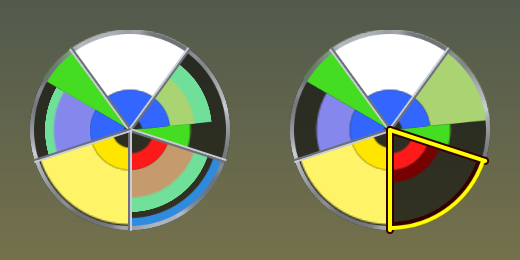
Your whole 5-man party in one circle. A radial health, resource, pet, shield and incoming-heal meter for World of Warcraft: Classic Forever and retail Midnight.
An early release. Bars are a shape, and the shape can be a pie.
Download for Classic Foreverv1.0.0 · 0.3 MB · free
Download for retail (Midnight)v1.0.0 · 0.3 MB · free · adds all 13 classes
The retail build hasn’t been played on a live retail client yet, so treat it as a test release.
Install
- Exit World of Warcraft.
- Unzip the download. You get a folder called
PartyHealthPie. - Move that folder into the AddOns folder for your version of the game:
Classic Forever: C:\Program Files (x86)\World of Warcraft\_forever_\Interface\AddOnsRetail: C:\Program Files (x86)\World of Warcraft\_retail_\Interface\AddOnsOn a Mac, the folder starts with/Applications/World of Warcraft/. If you installed the game somewhere else, look there. - Check the folder isn’t doubled. This file should exist:
...\AddOns\PartyHealthPie\PartyHealthPie.toc - Start the game. On the character select screen, click AddOns and make sure Party Health Pie is ticked.
- Try it. Type
/php demoin chat to see a sample party, and the same again to stop.
If it doesn’t show up
- Not in the AddOns list? Look for a doubled folder like
AddOns\PartyHealthPie\PartyHealthPie\, and make sure the download matches the folder: the Classic Forever zip goes in_forever_, the retail zip in_retail_. - Marked out of date? Tick Load out of date AddOns on the same screen.
- Updating? Exit the game, delete the old folder and install the new one. Your settings are kept.
How to read it
- Health fills the outer 3/5 of a wedge in class color and sinks toward the center as it drops.
- Resources fill the inner 2/5 and drain outward toward the health line.
- Pets take a full-height slice, 33% of their owner’s wedge.
- Shields are a blue band from the rim inward, sized by % of max health.
- Incoming heals are a pale green band starting where health ends.
- Low health (33% or below) turns the wedge deep red with a thick flashing outline.
- Dead is charcoal, disconnected is grey, and someone who left leaves a transparent wedge.
- Your target gets a yellow outline. Select a pet and only its slice lights up.
Healing with it
- Hover a wedge and press a heal key to cast on that player or pet. Hover a pet’s slice to heal the pet.
- Left-click a wedge to target them.
- On first login the addon turns on the game’s Mouseover Cast option so hovering works, and tells you in chat. You can change it under Options > Combat, or turn off Mouseover Healing in the addon’s settings.
Make it yours
- Drag it anywhere, and resize it from 90 to 420 pixels.
- Recolor every class, resource, class pet, low-health, shield, incoming-heal and target color.
- Pick a border: Steel, Iron, Silver, Gold or Brass.
- Set border and player color opacity separately.
- Turn pet wedges and resources on or off for each class.
- On retail, tick Secondary for a class to show its combo points, holy power, soul shards, chi, arcane charges, essence or runes in place of its main power.
Commands
/phpopen the settings (also under Options > AddOns)
/php demopreview a sample party
Good to know
- WoW locks mouseover targets during combat. If the party changes mid-fight, wedges may shuffle by party position until combat ends, but each wedge always shows who a hover would hit.
- The circle can’t be dragged during combat, and size changes apply when combat ends.
- A low-health wedge stays red until the player recovers to 50%. When the game hides party health from addons, it follows the 33% line both ways instead.
- Instant heals have no cast, so they don’t show an incoming-heal band.
- On retail, the game may not report other players’ secondary resources. If a class with Secondary ticked shows an empty band, untick it.